



How Can a Small CNC PCB Drilling and Milling Machine Support Prototyping and Light Production?
For many electronics workshops, laboratories, toolrooms, and small manufacturing teams, the production problem is not always mass output. Very often, the real problem is much more practical: how to drill accurate holes, mill small features, engrave simple parts, and test prototype designs without occupying the space, cost, and setup burden of a larger production cell.
That is where a small CNC PCB drilling and milling machine becomes useful. Chikin CNC describes this product as a compact enclosed CNC machine for precision prototyping and compact shop floors. The page states that this type of machine is useful when a workshop needs accurate hole placement, repeatable positioning, and a compact footprint without moving to a large production cell. It is positioned for electronics prototyping, fixture plates, small parts, and light milling tasks where detailed features must be machined consistently while setup stays simple and floor space remains controlled.
For B2B buyers searching for a small CNC PCB drilling machine, PCB drilling and milling machine, mini CNC PCB machine, PCB prototype drilling machine, or small CNC milling machine supplier, the key question should not be “Is the machine small?” A better question is: can the machine support the real prototyping workflow, board positioning needs, operator access, and light machining tasks that the workshop handles every week?
A compact machine can save space, but only a properly selected compact machine can save time.
Why Do Workshops Need a Small CNC PCB Drilling and Milling Machine?
In PCB prototyping, engineering samples, small fixture production, and light engraving work, many teams need flexibility. They may not produce thousands of identical boards per shift. Instead, they may need to test new board layouts, drill small batches, adjust a fixture plate, engrave a label, or create a small part for internal use.
A large production machine may be too much for this work. It may require more space, more setup planning, and more operating resources than the job deserves. An open-frame desktop machine may be too limited or too exposed for regular shop-floor use. A compact enclosed CNC machine sits between these two options.
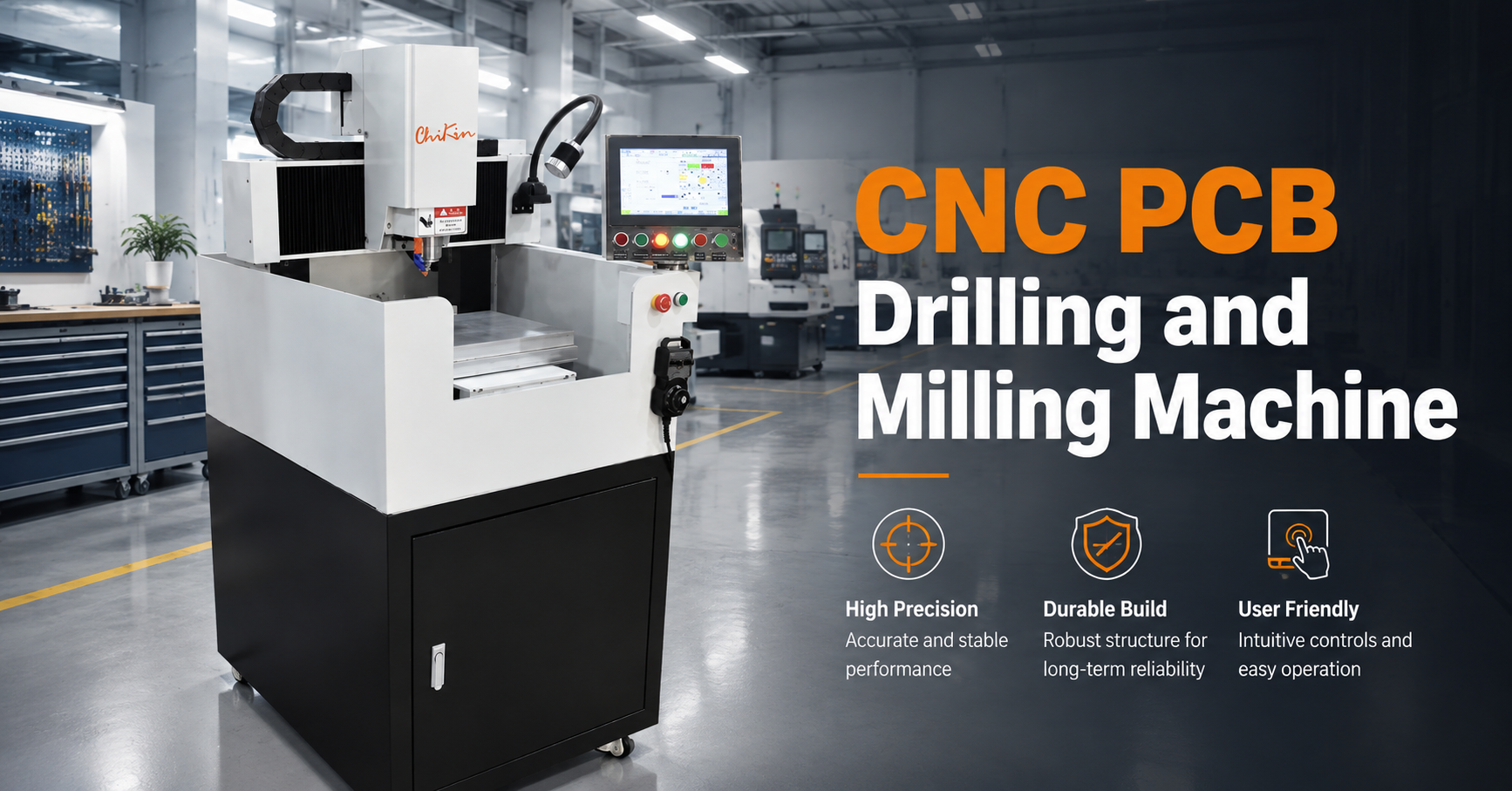
Chikin’s product page describes the machine as an enclosed CNC concept with a rigid cabinet, vertical spindle head, and integrated control interface for controlled subtractive machining. It is presented as a compact production tool with a protected cutting area, central spindle, flat metal worktable, and right-side touchscreen control panel.
This makes the machine relevant for users who need a more structured setup than a basic desktop system, but who do not need a full-size production machining center.
In practical terms, a compact PCB drilling and milling machine can help factories and workshops:
Improve repeatability in prototype hole drilling.
Reduce dependence on manual drilling or improvised setups.
Keep small machining work inside the engineering or toolroom area.
Support quick iteration for PCB samples and small workpieces.
Handle light engraving or milling tasks when properly configured.
Control chips better than an open table setup.
Give operators a defined machining zone and accessible controls.
The machine does not replace every type of PCB production equipment. It is not described as a high-volume production line. Its value is in precision, flexibility, compact layout, and controlled small-batch work.
What Does Chikin CNC’s Product Page Show About This Machine?
The product page identifies the machine as a Small CNC PCB Drilling Machine for Precision Prototyping and Compact Shop Floors. It also connects the product to a Mini 1 Spindle PCB Routing and Drilling Machine for Precision Prototyping, indicating that the machine is positioned for compact PCB-related drilling, routing, prototyping, and light machining applications.
Based on the visible structure, Chikin describes the machine as a box-style enclosed CNC machining system. It has a central spindle, flat metal worktable, and right-side touchscreen control panel. The page says the layout suggests a compact production tool designed for precision work in a protected cutting area. The enclosure helps contain chips and improves operator separation from the machining zone, while the wheeled base makes it easier to position the unit inside a lab, toolroom, or small manufacturing space.
This product information is important because it tells buyers how to think about the machine. It should not be evaluated as a general heavy-duty machine. It should be evaluated as a compact enclosed CNC workstation for precise small work.
Main Product Features and Buyer Meaning
| Product Feature | Product Page Information | Why It Matters for B2B Buyers |
|---|---|---|
| Compact CNC format | Designed for accurate hole placement, repeatable positioning, and compact footprint | Useful for labs, toolrooms, prototype rooms, and small manufacturing spaces |
| Enclosed machining area | Cabinet-style cutting zone surrounds the machining area | Helps contain chips and improves operator separation from the cutting zone |
| Vertical spindle head | Central spindle supports controlled subtractive machining | Suitable for drilling, engraving, pocketing, contouring, and light milling depending on setup |
| Flat metal worktable | Visible work surface appears to be a brushed or machined metal table | Supports fixture placement and small workpiece setup |
| Integrated touchscreen panel | Right-side touchscreen with physical buttons and emergency stop | Makes operation more direct for small-batch work and job changes |
| Mobile base | Casters at the base indicate easier repositioning | Useful for labs, prototype areas, and workshops where layouts change |
| Task lighting | Flexible work light helps visibility around the spindle area | Helpful during setup, inspection, and detailed work |
| Cable drag chain | Left-side cable drag chain suggests organized moving-axis wiring | Supports cleaner axis motion management |
| Industrial finish | Painted sheet metal enclosure with gray, white, and black finish | Balances durability, cleaning, and shop-floor appearance |
| Buyer confirmation needed | Exact spindle speed, travel range, controller specs, and material range are not provided in readable text | Buyers should confirm technical specs directly before purchase |
This table shows the main buying logic. The machine’s value is not only its small size. It is the combination of enclosure, spindle structure, worktable, integrated control, mobility, and practical operator access.
How Is This Machine Different from an Open-Frame Desktop PCB CNC Machine?
Many buyers compare a compact enclosed system with an open-frame desktop PCB CNC machine. That comparison is reasonable because both can serve small-scale machining needs. However, they are not the same type of tool.
An open-frame desktop machine may be cheaper and easier to observe from all sides. It may fit hobby use, educational projects, very light machining, or occasional testing. But it can create problems when used regularly in a production or engineering environment. Chips are more exposed. The operator has less separation from the work zone. Cable routing may be more vulnerable. Cleaning may depend more on the user. Noise and debris control may be less organized.
Chikin’s product page states that, compared with a desktop PCB CNC machine, the main advantage of this compact enclosed machine is the combination of enclosure, control access, and more industrial frame style. The page also says the machine appears suited to drilling, engraving, and light milling tasks where stable positioning matters more than high-volume throughput.
That statement is useful for buyers. The machine is not trying to be the cheapest desktop machine or the largest industrial system. It is positioned as a more practical enclosed option for small, precise work.
Why Does the Enclosure Matter?
The enclosure is one of the most important visible features. Chikin describes the cutting zone as surrounded by a cabinet-style structure. The page notes that this is practical for cleaner operation and better safety awareness, even though exact dust or coolant handling is not visible.
For B2B buyers, an enclosure matters for several reasons.
First, it helps define the machining area. Operators know where the work happens and where they should not reach during operation.
Second, it helps contain chips. This can reduce cleanup compared with fully open cutting.
Third, it supports a cleaner workshop layout. In a lab or prototype area, even small amounts of dust and chips can create inconvenience.
Fourth, it makes the machine feel more suitable for regular work, not only occasional experiments.
Still, buyers should not assume the enclosure includes every possible dust, coolant, or safety feature. The product page specifically says exact dust or coolant handling is not visible. Buyers should ask the supplier whether dust collection, chip trays, coolant support, or other management options are available.
Why Are HMI and Physical Controls Important?
A compact CNC machine may be used by engineers, prototype technicians, toolroom staff, or trained operators. These users often handle job changes, material changes, and quick adjustments. A clear interface can reduce setup confusion.
Chikin’s page identifies a right-side touchscreen panel with physical buttons and an emergency stop. It states that this provides a straightforward operator interface and is important in small-batch environments where quick job changes and immediate machine stop functions are part of daily work.
This is more important than it may seem. In low-volume and prototype environments, jobs change often. Operators may switch between PCB drilling, engraving plates, small fixture parts, or light milling work. If the interface is unclear, the machine may slow down the very workflow it is supposed to improve.
Buyers should ask:
What controller is used?
Can operators easily load drilling or milling files?
What file formats are supported?
Can job settings be saved?
What does the emergency stop control?
Can the interface language be customized?
How are alarms displayed?
What training is included?
A good small CNC milling machine supplier should explain the control system clearly before purchase.
What Applications Fit This Machine Best?
Chikin’s product page lists typical application scenarios based on the visible design. These include PCB prototype drilling and related light machining tasks, nameplates, labels, engraving plates, mold inserts, dies, small precision parts, fixture components, and custom tooling.
This application range is broad but still realistic for a compact CNC machine. It suggests that the machine is not limited to only PCB drilling. Depending on configuration and material compatibility, it may also support light machining and engraving work.
Common application scenarios include:
PCB prototype drilling.
Small PCB milling or contouring tasks.
Engraving labels or nameplates.
Creating small fixture components.
Machining simple toolroom parts.
Processing small mold inserts or dies.
Testing CNC toolpaths before larger production.
Supporting engineering departments with quick samples.
For users seeking a PCB prototype drilling machine, the enclosed compact layout is useful when repeatable drilling must happen in a controlled space. If the same equipment is also used as a small CNC PCB milling machine, Chikin’s page recommends confirming material range, spindle behavior, and fixturing approach before purchase.
That recommendation should be taken seriously. A machine may support several tasks, but buyers should verify each task before ordering.
How Should Buyers Evaluate Drilling Performance?
The product page does not provide full readable numerical specifications for spindle speed, travel range, axis repeatability, or controller configuration. Chikin recommends evaluating this equipment by job type rather than assumption.
For PCB drilling, buyers should define:
Board material.
Board size.
Hole diameter range.
Hole count per job.
Required hole-position accuracy.
Whether through holes or shallow drilling are needed.
Workholding method.
Dust control needs.
Expected batch size.
Whether drilling files can be imported easily.
A buyer should also ask about drill-bit compatibility, spindle runout, collet type, tool change method, and whether the machine is suitable for repeated small-hole drilling.
Small PCB drill bits can be sensitive to runout and vibration. Even if the machine looks compact and stable, performance must be verified for the actual tool sizes and board materials used in production.
How Should Buyers Evaluate Milling and Engraving Performance?
For light milling and engraving, the buyer should ask different questions. Milling creates side loads. Engraving may require surface consistency and fine tool control. Fixture plates may need stable clamping. Nameplates may require clean text or pattern quality.
Chikin’s page states that the machine fits CNC subtractive machining. In practical terms, the spindle removes material from the workpiece according to programmed toolpaths. Depending on setup, this can include drilling, pocketing, contouring, engraving, or light milling.
This description is useful, but it does not mean every material or milling depth is suitable. Buyers should confirm:
Material range.
Maximum practical cutting depth.
Tool diameter range.
Spindle behavior under load.
Table clamping method.
Chip evacuation.
Surface finish expectation.
File preparation workflow.
Whether cooling or lubrication is needed.
Whether the enclosure allows easy cleaning after milling.
The best way to confirm suitability is sample testing. Send the supplier real PCB material, engraving plate material, or fixture plate samples. Ask for test cuts that match the intended process.
Product Selection Checklist
| Selection Area | What Buyers Should Ask | Why It Matters |
| Main application | Is the primary job PCB drilling, engraving, light milling, or fixture production? | Different jobs require different tooling and setup |
| Work envelope | What part size and board size can the machine handle? | Ensures the compact machine fits real workpieces |
| Spindle performance | What speed range, runout, tool holder, and tool compatibility are provided? | Critical for PCB drilling and fine machining |
| Table and fixturing | How are boards or small parts clamped? | Repeatability depends on workholding stability |
| Controller interface | What software, file format, and operating language are supported? | Affects daily usability and job changeover |
| Enclosure design | How are chips, dust, and operator access managed? | Helps keep the work area cleaner and safer |
| Mobility | Are casters suitable for the workshop layout? | Useful when the machine must move within a lab or toolroom |
| Maintenance access | Can the machine be cleaned and serviced easily? | Reduces downtime and protects long-term use |
| Cable management | Are axis cables protected during motion? | Helps reliability in repeated operation |
| Supplier support | Are training, sample testing, spare parts, and customization available? | Reduces purchase risk |
How Does This Machine Fit a Prototype Department?
A prototype department often needs speed in a different sense from a production line. It does not only need fast spindle movement. It needs fast decision-making. Engineers may need to test a layout, drill a board, engrave a test label, modify a fixture, and repeat. Waiting for a production department or external supplier can slow the development cycle.
A compact PCB prototyping machine can support faster internal iteration. If the engineering team can prepare a job file, clamp the workpiece, machine the part, inspect it, and adjust quickly, the whole development process becomes more efficient.
Chikin’s machine is relevant to this environment because it combines a compact footprint with an enclosed machining area, integrated HMI, task lighting, and mobile base. The product page says casters at the base can make the machine easier to position inside a lab, toolroom, or small manufacturing space.
This is especially useful when the machine needs to share space with test benches, inspection stations, storage racks, or assembly tables. A fixed heavy machine may not suit that environment.
How Does This Machine Fit a Small Manufacturing Floor?
Small manufacturing floors often need flexible equipment. One day the team may drill prototype boards. Another day it may process an engraving plate or simple fixture component. A compact CNC machine can help absorb this mixed workload when the material range and cutting requirements are suitable.
The product page states that the machine may function as a PCB drilling and milling machine for prototyping for some users, while for others it may be better suited to mold components, fixture parts, or engraving plates.
That flexibility is valuable, but it must be managed carefully. Buyers should avoid overloading the machine with tasks that belong on a heavier CNC platform. The machine should be selected for precision small work, not aggressive heavy machining.
For small factories, the ideal use case is controlled light-duty machining with frequent changeovers, limited space, and moderate output.
How Should Buyers Choose a Supplier?
Choosing a small CNC PCB drilling machine supplier is not only about comparing machine photos. The supplier should help buyers confirm whether the machine fits the intended materials, board sizes, hole sizes, software workflow, and production volume.
Chikin’s product page recommends that buyers define the real job first. If the primary need is PCB drilling, they should ask about drill-bit compatibility, fixturing, and repeated board-positioning workflow. If the need is broader, such as engraving and light milling, buyers should consider work envelope, table setup, and controller usability. The page also recommends evaluating footprint, power requirements, chip management, and whether a mobile base is useful in the facility.
A good supplier should be able to answer:
What is the exact machine configuration?
What controller does the machine use?
What is the supported work area?
What spindle and tool holder are included?
What PCB materials can be processed?
What non-PCB materials are suitable for light milling or engraving?
What dust or chip collection is recommended?
How are boards clamped for repeated drilling?
Can the machine be tested with buyer samples?
What training and spare parts are available?
What maintenance is required?
A supplier that only quotes price without discussing these points may not be the right partner for a production or engineering environment.
What Makes Chikin’s Machine Different from a Larger Shop Machine?
A larger shop machine may offer more power, more travel, more rigidity, heavier cutting capability, and higher production capacity. That is useful when the factory needs full machining center performance. But larger equipment may also require more floor space, stronger foundation planning, more complex setup, and higher investment.
Chikin’s compact machine targets a different need. The page says the main advantage is the combination of enclosure, control access, and more industrial frame style for buyers comparing desktop PCB CNC machines with larger shop machines. It appears suited to drilling, engraving, and light milling tasks where stable positioning matters more than high-volume throughput.
That positioning is important. The machine is not intended to be the strongest CNC machine in the factory. It is intended to be the right-size tool for detailed, compact, controlled machining work.
Buyers should choose a larger machine if they need heavy cutting, large parts, high production capacity, or complex multi-axis machining. They should choose a compact enclosed machine if they need prototyping flexibility, space efficiency, controlled light machining, and practical operator access.
What Mistakes Should Buyers Avoid?
The first mistake is buying only by machine size. A small machine is not automatically suitable for every prototype task. Buyers must confirm work area, spindle details, controller, and material compatibility.
The second mistake is treating it like a high-volume PCB production line. This machine is better positioned for prototyping, compact shop floors, and light machining tasks.
The third mistake is assuming dust or coolant handling from the enclosure alone. Chikin’s page states that exact dust or coolant handling is not visible, so buyers should confirm chip management directly.
The fourth mistake is ignoring fixturing. PCB drilling accuracy depends heavily on how the board is held.
The fifth mistake is focusing only on spindle power while ignoring spindle runout, table flatness, axis repeatability, controller usability, and maintenance access. Chikin’s page recommends that buyers ask about these real-use verification points because exact performance numbers are not provided.
The sixth mistake is skipping sample testing. A supplier demonstration using generic material may not prove performance on the buyer’s PCB material, engraving plate, or fixture part.
Practical Case: Electronics Prototype Workshop
Consider an electronics prototype workshop that produces small PCB samples, test fixtures, and engraved labels for internal projects. Before purchasing a compact CNC machine, engineers drilled some boards manually and outsourced certain small milling tasks. The process was slow. Rework was common when hole positions shifted slightly. Some fixture changes took days because the team had to wait for an outside shop.
The workshop decides to evaluate a small CNC PCB drilling and milling machine. The goal is not mass production. The team needs a compact enclosed system that can sit near the engineering area, handle small PCB drilling jobs, support light engraving, and allow repeated setup without occupying a large machining center.
Chikin’s machine would be relevant to this case because the product page highlights accurate hole placement, repeatable positioning, compact footprint, enclosed CNC structure, vertical spindle head, integrated control interface, mobile base, task lighting, and use cases such as PCB prototype drilling, engraving plates, fixture components, and custom tooling.
Before buying, the workshop should send the supplier:
Maximum PCB size.
Common hole diameters.
Required hole-position accuracy.
Engraving material.
Fixture material.
Expected weekly workload.
Available floor space.
Power conditions.
Tooling requirements.
Sample files for test machining.
If the machine passes sample testing, the workshop can reduce outsourcing for small jobs and improve prototype turnaround. This is a realistic use case for a compact CNC platform.
How Should Buyers Prepare an Inquiry?
A useful inquiry should be specific. Instead of asking only for “best price,” buyers should explain the work clearly.
Example inquiry:
“We need a compact enclosed CNC machine for PCB prototype drilling, engraving plates, and light milling of small fixture components. Our maximum PCB size is [size], common hole diameter range is [range], and expected workload is [quantity] jobs per week. Please confirm work envelope, spindle details, controller interface, supported file formats, fixturing options, chip management, power requirements, and whether sample machining is available.”
This type of inquiry helps the supplier recommend the correct configuration and prevents misunderstanding.
FAQ
What is a small CNC PCB drilling and milling machine used for?
It is used for accurate hole placement, repeatable positioning, PCB prototype drilling, engraving plates, fixture components, small parts, and light milling tasks. Chikin’s product page lists PCB prototype drilling, nameplates, labels, engraving plates, mold inserts, dies, small precision parts, fixture components, and custom tooling as common scenarios.
Is this machine suitable for high-volume PCB production?
The product page positions the machine for prototyping, small-batch production, and compact shop-floor use rather than high-volume throughput. Buyers needing mass PCB drilling should evaluate dedicated high-throughput PCB drilling equipment.
What is the main advantage over an open-frame desktop CNC?
Chikin states that the main advantage is the combination of enclosure, control access, and a more industrial frame style. The enclosure helps contain chips and improves operator separation from the machining zone.
What should buyers confirm before purchase?
Buyers should confirm spindle runout, table flatness, axis repeatability, controller interface, maintenance access, enclosure cleaning, emergency stop access, workpiece clamping, tool changing, cable routing, power requirements, and chip management.
Can it be used for engraving and light milling?
The product page says that depending on setup, the machine can support drilling, pocketing, contouring, engraving, or light milling. Buyers should confirm material range, spindle behavior, and fixturing before purchase.
Why is the mobile base useful?
The product page notes that casters at the base can make the unit easier to position inside a lab, toolroom, or small manufacturing space where layout changes are common.
Conclusion
A small CNC PCB drilling and milling machine is a practical choice for workshops that need accurate hole placement, repeatable positioning, compact floor use, and flexible small-part machining. It is especially relevant for PCB prototyping, engineering samples, engraving plates, fixture components, mold inserts, small precision parts, and light milling tasks.
Chikin CNC’s product page positions this machine as a compact enclosed CNC solution with a rigid cabinet, vertical spindle head, integrated control interface, central spindle, flat metal worktable, right-side touchscreen, protected cutting area, mobile base, task lighting, and cable drag chain. These visible features support a controlled machining workflow for labs, toolrooms, prototype rooms, and small manufacturing spaces.
For B2B buyers, the best purchasing process is objective: define the real job first, confirm the work envelope, review spindle and controller details, check fixturing, ask about chip management, and request sample testing. A compact CNC machine should not be chosen only because it is small. It should be chosen because it matches the workshop’s real production rhythm.