



An enclosed laser marking machine helps industrial manufacturers apply durable identification to metal components, equipment nameplates, electronic assemblies, and suitable manufactured parts without relying on adhesive labels or ink-based printing.
For automotive suppliers, precision machining factories, and electronics manufacturers, the challenge is not simply producing a visible mark. The identification must remain readable, match production records, and meet quality requirements throughout manufacturing and subsequent handling.
The best enclosed laser marking machine is one that can consistently produce qualified identification marks on actual production materials while meeting workstation safety, software, and throughput requirements.
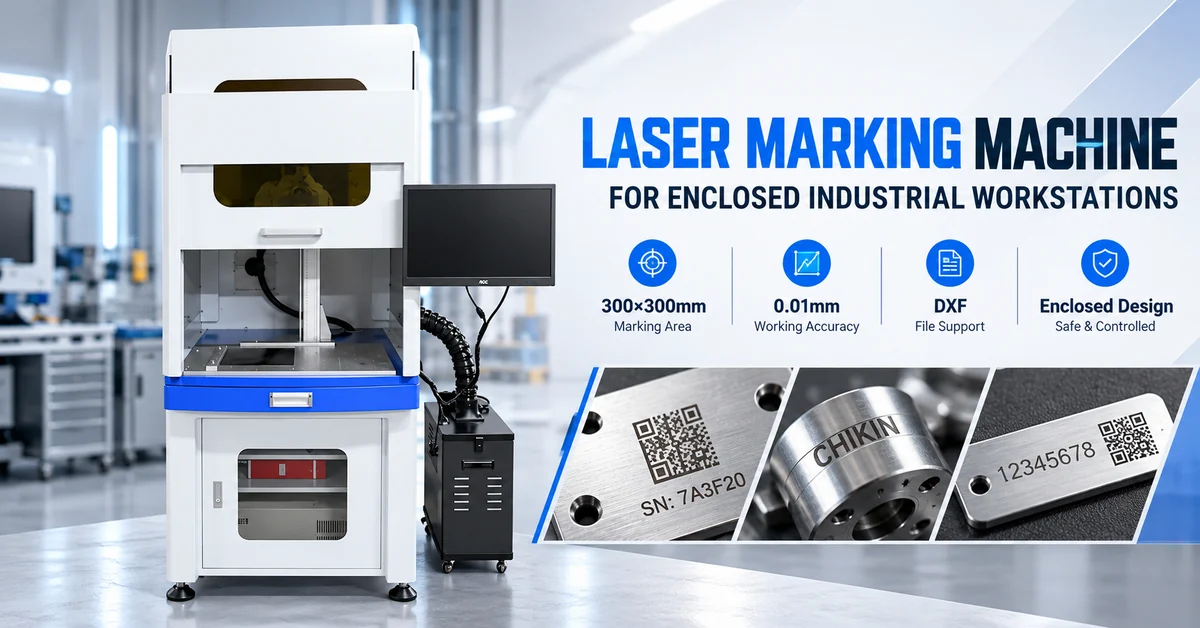
CHIKIN CNC offers a cabinet-style laser marking workstation with a published 300×300mm marking area, 0.01mm working accuracy, DXF graphic compatibility, and an integrated operator interface.
These specifications provide a starting point for evaluation, but successful equipment selection requires additional checks involving laser configuration, material compatibility, fixture design, code readability, and actual sample results.
This guide explains how to evaluate the machine and prepare a technically complete purchasing inquiry.
1. What Is an Enclosed Laser Marking Machine?
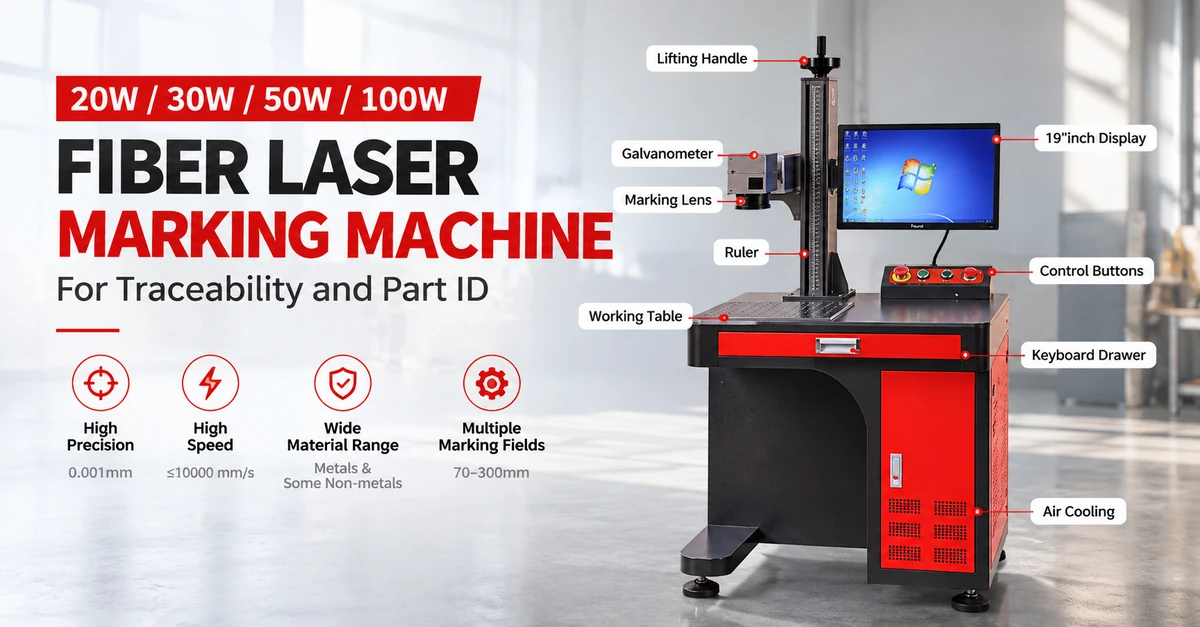
An enclosed laser marking machine uses focused laser energy to create text, numbers, symbols, or other identification features within a cabinet-style processing workstation.
Unlike mechanical engraving, the laser does not require a conventional cutting tool to contact the part.
Depending on the laser type, material, and processing parameters, marking may involve surface color changes, oxidation, localized material removal, or engraving.
Common industrial applications include:
-
Serial numbers on metal components.
-
Product and equipment identification plates.
-
Manufacturing batch codes.
-
Part numbers and production references.
-
Logos and technical information.
-
Direct Part Marking (DPM) applications.
-
Selected electronics and PCB identification tasks.
Laser marking is particularly useful when production requires programmable identification with limited use of inks or labels.
However, marking, engraving, and cutting are different operations. A machine intended primarily for marking should not automatically be considered suitable for cutting sheet metal or processing PCB outlines.
2. Which Manufacturers Benefit from Enclosed Laser Marking?
The target buyers are manufacturers that require controlled part identification and consistent marking operations.
| Buyer Segment | Typical Application | Main Purchasing Requirement |
|---|---|---|
| Automotive parts suppliers | Metal component identification | Traceability and repeatability |
| CNC machining factories | Serial numbers and part codes | Positioning and mark readability |
| Electronics manufacturers | Housings and selected components | Precision and surface compatibility |
| Industrial equipment manufacturers | Equipment plates and product IDs | Durability and character accuracy |
| Metal fabrication workshops | Batch codes and identification | Flexible part positioning |
| Tool and fixture manufacturers | Tool numbers and asset tracking | Permanent identification |
| Quality-control departments | Inspection and production references | Accurate record matching |
| Equipment system integrators | Standalone marking workstations | Interface and fixture requirements |
For these buyers, the main objective is to establish a repeatable identification process that fits their existing production workflow.
A cabinet-style workstation is particularly worth considering where the factory wants a defined processing area, organized operator controls, and the ability to secure small or medium-sized parts during marking.
For unusually large or irregular workpieces, an open workstation or separate marking head may be more practical.
3. CHIKIN CNC Laser Marking Machine: Product Features and Specifications
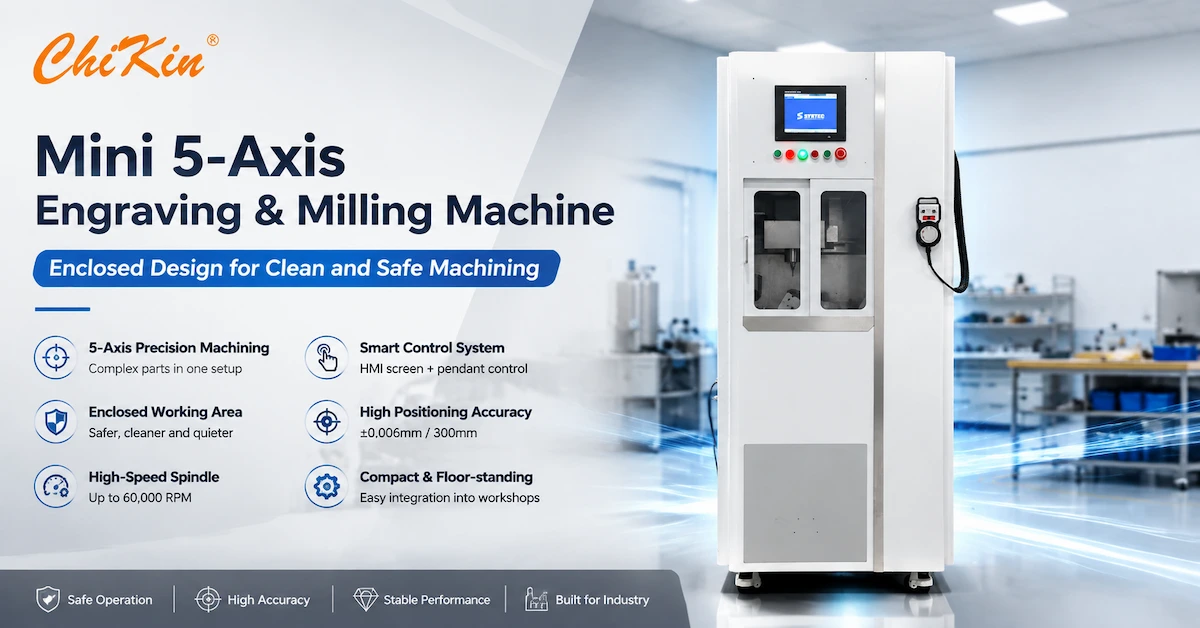
The CHIKIN CNC Laser Marking Machine for Enclosed Industrial Workstations is presented as a floor-standing industrial workstation.
The product photographs show a light-colored cabinet, blue lower section, front viewing window, internal worktable, mounted display, and a separate adjacent equipment unit.
These features support a compact, operator-guided marking workflow.
Published Technical Specifications
| Parameter | Published Information |
|---|---|
| Product designation | Fiber Optical Laser Marking Machine |
| Application | Laser marking |
| Marking area | 300×300mm |
| Working accuracy | 0.01mm |
| Graphic format | DXF |
| CNC control | Yes |
| Cooling mode | Water cooling |
| Machine weight | 160kg |
| Core component | Laser source |
| Warranty | 1 year |
| Core component warranty | 1 year |
| Condition | New |
| Country of origin | China |
| Outgoing inspection video | Listed as provided |
The above figures come from the supplied product specification. Exact laser power, wavelength, source manufacturer, safety classification, and performance measurement conditions require confirmation.
What Are the Main Workstation Advantages?
Integrated operator interface: The mounted display allows the operator to access machine controls without relying on a separate desktop workstation.
Defined processing area: The cabinet-style structure provides a dedicated space for fixture-based marking.
Service access: Lower cabinet doors can support access to equipment components, subject to the final machine design.
Programmable identification: DXF compatibility provides a basis for importing specified graphical marking data.
The product specification identifies the equipment as a fiber optical laser marking machine. However, its general laser-type field is not sufficiently detailed to establish the exact optical source configuration.
Buyers should request a complete machine-specific datasheet before comparing laser power or source technology.
4. What Does a 300×300mm Laser Marking Area Mean?
One of the most important specifications is the nominal 300×300mm marking field.
This describes the published processing area, not necessarily the maximum physical dimensions of a workpiece that can fit inside the cabinet.
A large component may fit inside the enclosure but still require repositioning if its marking locations extend beyond the usable laser field.
Conversely, an item smaller than 300×300mm may require special fixtures or working-distance adjustments.
Marking Area vs Actual Part Size
| Evaluation | Why It Matters |
|---|---|
| Nominal marking field | Determines the advertised processing envelope |
| Internal cabinet clearance | Limits workpiece dimensions and handling |
| Laser working distance | Affects focus and available part height |
| Fixture height | Changes workpiece position relative to the optics |
| Marking-field edge performance | May affect distortion and mark consistency |
| Multiple marking locations | May require repositioning or program changes |
How Should Buyers Verify the Marking Field?
Ask the supplier to demonstrate the required marking quality at the center, edges, and corners of the actual usable field.
A practical acceptance test can use a measured reference pattern distributed across the work area.
This helps establish whether dimensional consistency remains acceptable across the region needed for production.
The published 0.01mm working accuracy should not be interpreted automatically as guaranteed character accuracy, laser spot size, or finished-code tolerance.
Those capabilities require a defined measurement method and actual marking results.
5. What Materials Can an Industrial Fiber Laser Marker Process?
Fiber laser marking technology is commonly evaluated for metal parts and selected coated or engineered materials.
However, material compatibility depends on the exact laser source, surface properties, required marking contrast, and part function.
Material and Application Matrix
| Material | Potential Marking Application | Main Quality Concern |
|---|---|---|
| Stainless steel | Serial numbers and identification plates | Contrast and surface changes |
| Carbon steel | Mechanical part identification | Durability and corrosion considerations |
| Aluminum | Housings and machined parts | Readability and surface finish |
| Anodized aluminum | Equipment labels and components | Coating response |
| Brass | Fittings and identification plates | Contrast and edge definition |
| Coated metals | Product information | Coating removal or discoloration |
| Engineering plastics | Selected component IDs | Material-specific laser response |
| PCB materials | Qualified identification applications | Substrate, coating and copper damage |
These are potential applications, not a guaranteed compatibility list for every version of the CHIKIN workstation.
Why Should Buyers Test Actual Components?
Two aluminum components may respond differently if one is anodized and the other is untreated.
Likewise, a laser parameter that provides good contrast on one polymer may discolor or damage another.
For electronic assemblies, testing is especially important because nearby components, coatings, and conductors may be sensitive to laser energy.
The recommended approach is to qualify the real part material, surface finish, and marking location before approving the machine.
6. How Does DXF Compatibility Support Industrial Marking?
The supplied specification identifies DXF as a supported graphic format.
DXF files can carry vector-based geometry commonly used in engineering and production drawing workflows.
This may be useful when the factory needs controlled text outlines, logos, shapes, or specified marking positions.
A typical workflow includes:
-
Preparing the marking layout.
-
Importing the relevant graphic file.
-
Checking dimensions, scale, and orientation.
-
Positioning the workpiece in the fixture.
-
Establishing approved laser parameters.
-
Processing the mark.
-
Inspecting the result.
Does DXF Support Mean Automatic Serial Number Generation?
No.
DXF compatibility alone does not establish that the controller can automatically increment serial numbers, generate Data Matrix codes, import database records, or communicate with a manufacturing execution system.
Those functions must be confirmed separately.
For traceability projects, ask whether the software supports variable data, duplicate-code prevention, user permissions, and production-record integration.
These features can be more important than basic graphic import capability.
7. Enclosed Laser Marking vs Open Laser Marking vs Dot-Peen Marking
Different marking technologies suit different part sizes, production conditions, and identification requirements.
| Factor | Enclosed Laser Marking | Open Laser Marking | Pneumatic Dot-Peen |
|---|---|---|---|
| Marking method | Laser-based | Laser-based | Mechanical indentation |
| Workstation format | Cabinet-style | Open working arrangement | Separate or integrated marking head |
| Direct tool contact | No | No | Yes |
| Large-part accessibility | Cabinet-dependent | Often more flexible | Head-dependent |
| Laser safety requirements | Enclosure and interlocks must be verified | Appropriate guarding required | No laser source |
| Mechanical surface deformation | Depends on laser process | Depends on laser process | Intentionally produces indentations |
| Fine markings | Depends on laser and optics | Depends on laser and optics | Depends on pin and controller |
| Main selection factor | Controlled workstation and application fit | Accessibility and guarding | Material and indentation requirements |
An enclosed workstation may be preferable for repeated marking of small parts, provided its internal clearance and handling layout meet production requirements.
An open laser workstation may provide easier access to larger components but requires an appropriate laser safety arrangement.
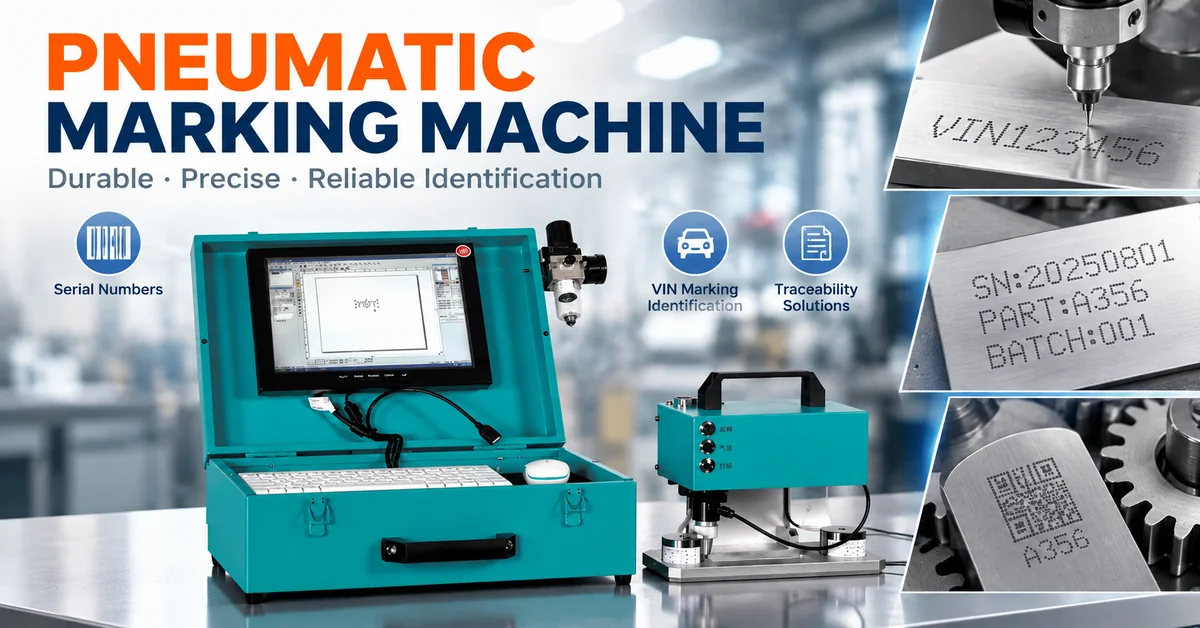
Pneumatic dot-peen marking may be suitable when a physical indentation is required.
The best technology should be selected from sample quality, workpiece requirements, applicable safety standards, and total production cost.
8. Direct Part Marking: How to Verify Serial Numbers and 2D Codes
Industrial traceability requires more than placing identification on a part.
The marking process must produce information that can be correctly interpreted and linked to manufacturing records.
For ordinary serial-number text, visual and dimensional inspection may be sufficient when permitted by the customer's specification.
For machine-readable Data Matrix codes, additional verification may be required.
What Is DPM Verification?
Direct Part Marking refers to applying identification directly to a component rather than attaching a separate label.
For applicable two-dimensional direct-part-marked symbols, ISO/IEC 29158:2025 provides a recognized method for assessing symbol quality.
It addresses evaluation conditions and grading methods for direct-part-marked symbols.
The standard does not guarantee that any particular laser machine can generate compliant codes.
Marking Quality Verification Checklist
| Quality Parameter | Inspection Objective |
|---|---|
| Content accuracy | Correct serial number or identification |
| Position | Correct location relative to component datums |
| Character clarity | Readable text and defined edges |
| Contrast | Suitable recognition under inspection conditions |
| Code readability | Reliable decoding with the intended reader |
| DPM quality | Agreed verification grade where applicable |
| Surface condition | No unacceptable substrate damage |
| Repeatability | Consistent results across production samples |
| Traceability | Correct link between part and production record |
Can This Machine Produce Data Matrix Codes?
The product is intended for laser marking, but the supplied specification does not explicitly confirm Data Matrix generation, verification, or database integration.
Buyers requiring these functions should request a demonstration with their actual code format and production data.
A successful demonstration should include a suitable scanner or verifier rather than visual inspection alone.
9. Laser Marking Machine Safety: What Must Buyers Verify?
The enclosed cabinet is an important workstation feature, but an enclosure does not automatically establish a laser safety classification.
Industrial buyers must verify the actual safety design of the delivered configuration.
Relevant considerations include:
-
Laser classification and documentation.
-
Door and access-panel interlocks.
-
Suitable protective viewing windows.
-
Emergency-stop functionality.
-
Appropriate electrical protection.
-
Fume extraction and filtration.
-
Operator instructions and training.
-
Maintenance access and service procedures.
IEC 60825-1, Safety of Laser Products — Equipment Classification and Requirements, is a relevant international safety reference.
The correct safety requirements depend on the machine configuration and destination market.
Before ordering, request the actual laser classification, protective-system details, and relevant compliance documentation.
Do not assume Class 1 operation or CE certification solely from the appearance of an enclosed cabinet.
10. Factory Acceptance Test: How to Qualify the Marking Machine
A Factory Acceptance Test (FAT) provides a structured way to confirm that a machine meets agreed requirements before shipment.
For a precision identification workstation, the FAT should evaluate actual marked parts rather than merely demonstrating that the laser source operates.
Recommended FAT Checklist
| Test Item | Recommended Acceptance Method |
|---|---|
| Laser source | Confirm the quoted type, output and configuration |
| Marking area | Verify the required 300×300mm field |
| Working accuracy | Check the specified measurement method and results |
| DXF import | Process the buyer's actual graphic file |
| Material compatibility | Mark representative production samples |
| Mark quality | Inspect readability, contrast and surface condition |
| Position consistency | Measure multiple marks on repeated parts |
| Code verification | Check required DPM quality, if applicable |
| Cycle time | Measure a complete production cycle |
| Safety systems | Demonstrate interlocks and emergency stops |
| Cooling system | Confirm the actual water-cooling configuration |
| Documentation | Review instructions, inspection records and warranty terms |
Sample Marking Test Procedure
Step 1: Supply the actual workpiece material and finish.
Step 2: Define the required marking content, size, location, and acceptance criteria.
Step 3: Prepare the fixture and approved processing program.
Step 4: Produce multiple samples using controlled settings.
Step 5: Inspect contrast, dimensions, readability, and surface condition.
Step 6: Repeat the test across the required marking field.
Step 7: Record the approved settings and production cycle time.
A supplier-provided outgoing inspection video can support preliminary review, but it is not a substitute for a machine-specific acceptance report.
The supplied product listing indicates that an outgoing inspection video is available while a machinery test report is not listed as available. Buyers should request any additional records needed for their procurement requirements.
11. How to Calculate Laser Marking Production Capacity
Industrial buyers should evaluate the complete marking cycle, not only the laser's advertised scanning speed.
A realistic production cycle includes:
Total Cycle Time = Loading + Positioning + Marking + Verification + Unloading
For repeated production, actual throughput also depends on fixture design, operator workflow, job changes, and inspection requirements.
Main Factors Affecting Marking Productivity
| Factor | Why It Matters |
|---|---|
| Marking content | More characters or complex graphics require processing time |
| Material | Different surfaces require different laser settings |
| Marking contrast | Additional passes may be necessary |
| Fixture design | Influences positioning and loading time |
| Batch size | Affects changeover frequency |
| Verification | Adds inspection time where required |
| Software functions | May simplify repeated job preparation |
A production demonstration should use the actual identification format and material rather than an unusually simple test logo.
For high-mix factories, quick fixture changes and reliable program management may matter as much as laser speed.
12. What Affects Enclosed Laser Marking Machine Price?
The initial purchase price is only one component of the investment.
Cost differences may reflect laser source configuration, optics, workstation size, software functionality, cooling arrangements, safety systems, fixtures, and service scope.
Total Cost of Ownership Checklist
| Cost Factor | What Buyers Should Confirm |
|---|---|
| Laser source | Manufacturer, power and supported materials |
| Marking optics | Field size and performance requirements |
| Fixtures | Standard or application-specific |
| Software | DXF support and required traceability functions |
| Cooling | Water-cooling system and maintenance |
| Extraction | Fume-removal equipment and filters |
| Installation | Commissioning and training scope |
| Spare parts | Availability and replacement cost |
| Warranty | Coverage and exclusions |
| Shipping | Packaging, destination and delivery terms |
The supplied specification lists a one-year warranty and one-year core-component warranty.
The exact coverage, start date, exclusions, and service arrangements should be confirmed before contracting.
Cost per Accepted Part
For production comparisons, use:
Marking Cost per Accepted Part = Total Allocated Marking Cost ÷ Accepted Marked Parts
This approach considers operating expense and rejected identification results rather than machine price alone.
It is especially useful when comparing different marking technologies or workstation configurations.
13. How to Prepare an RFQ for an Industrial Laser Marking Workstation
A technically complete request for quotation helps suppliers understand the actual production requirement.
Before requesting pricing, prepare the following information.
| RFQ Item | Information to Provide |
|---|---|
| Workpiece material | Metal alloy, plastic or other substrate |
| Surface finish | Polished, coated, anodized or untreated |
| Component dimensions | Length, width, height and weight |
| Marking content | Serial number, logo, text or code |
| Required marking field | Dimensions and multiple-mark locations |
| Marking quality | Contrast, dimensions and durability |
| File format | DXF and any other required format |
| Production volume | Parts per hour or shift |
| Identification workflow | Manual data entry or variable production data |
| Verification | Visual inspection or specified DPM grade |
| Factory conditions | Power, cooling, extraction and available space |
| Service requirements | Training, warranty and spare parts |
Why Evaluate CHIKIN CNC?
CHIKIN CNC is operated by Shenzhen ChiKin Automation Equipment Co., Ltd., a China-based supplier of PCB manufacturing and related industrial automation equipment.
Its equipment portfolio includes laser marking, PCB drilling, routing, and other precision processing systems.
For buyers comparing industrial suppliers, the company provides information about its engineering and service capabilities.
The most useful next step is to confirm the current machine configuration and test the required application before finalizing an order.
Request a Laser Marking Machine Technical Review
If your factory needs a controlled workstation for metal part identification, share your workpiece drawings, material details, marking content, and production requirements.
Review the CHIKIN enclosed laser marking machine and discuss the exact laser source, working area, safety configuration, and software functions required.
The product listing currently shows an out-of-stock status in the supplied product information, so availability and delivery timing must be confirmed.
Contact CHIKIN CNC to Request Configuration Details and a Quotation
A clear application brief is the best foundation for selecting a reliable industrial identification system.
14. Frequently Asked Questions About Enclosed Laser Marking Machines
1. What is an enclosed laser marking machine used for?
It is used to apply identification marks inside a cabinet-style workstation. Common applications include serial numbers, product information, equipment plates, and selected industrial traceability markings.
2. Is an enclosed laser marking machine safer than an open machine?
An appropriate enclosure can reduce access to laser radiation, but safety depends on the actual classification, protective window, interlocks, guarding, and operating procedures. Enclosure appearance alone does not demonstrate compliance.
3. What is the marking area of the CHIKIN laser marking workstation?
The published specification lists 300×300mm. Buyers should confirm the usable field, marking quality at its edges, and internal clearance for the intended workpieces.
4. Can the machine mark stainless steel and aluminum?
These are common candidate materials for fiber laser marking. Actual compatibility depends on the laser source, alloy, surface finish, and quality requirements. Sample marking is recommended.
5. Does the 0.01mm accuracy specification guarantee mark dimensions?
No. The published working accuracy does not independently establish final mark tolerance, minimum line width, or code quality. Buyers should request the measurement method and representative results.
6. Can this machine import DXF files?
DXF is listed as a supported graphic format. The buyer should verify the exact file-import workflow and whether the software supports the required dimensions, geometry, and production functions.
7. Does the CHIKIN laser marker support automatic serial numbering?
The supplied information does not confirm this function. Buyers should request a demonstration of variable data, numbering, and any required production-system integration.
8. Can an enclosed laser marking machine create Data Matrix codes?
Many laser systems can be configured for such applications, but code-generation capability is not confirmed for this specific product. Verify software support and code readability before purchase.
9. What maintenance does a fiber laser marking workstation require?
Maintenance may involve optics inspection, fixture cleaning, ventilation systems, cooling equipment, electrical checks, and software support. The exact schedule depends on the delivered configuration.
10. How should overseas buyers evaluate this CHIKIN machine before ordering?
Confirm the laser source, marking field, material compatibility, safety classification, cooling arrangement, software features, sample quality, warranty, and availability. Provide actual production parts and drawings to support a technical review.
Conclusion
Selecting an enclosed laser marking machine requires more than comparing equipment prices or advertised working accuracy.
For industrial manufacturers, the important factors are marking quality, material compatibility, fixture stability, safe workstation operation, traceability functions, and accepted production output.
The CHIKIN CNC laser marking workstation provides a published 300×300mm marking area, 0.01mm working accuracy, DXF compatibility, and a cabinet-style industrial configuration.
These features make it a relevant option for buyers evaluating controlled identification of suitable metal parts and other manufacturing components.
However, actual laser specifications, software functions, material performance, safety classification, and production capacity should be verified before purchase.
A sample-marking test and documented factory acceptance procedure can help reduce equipment-selection risks and ensure that the chosen system meets real manufacturing requirements.
For overseas manufacturers seeking laser marking solutions, CHIKIN CNC offers an opportunity to evaluate industrial equipment configurations against specific part-identification needs.
Explore the CHIKIN CNC laser equipment portfolio or contact the CHIKIN CNC team for a technical review.
Share your part materials, identification drawings, required marking area, verification criteria, and production targets to discuss a suitable configuration and confirm current availability.