




A PCB V-CUT process depends on a controlled cutting edge. When the blade is new and correctly adjusted, the groove depth, angle, and residual thickness can remain within the approved process window. As the blade wears, however, the cutting geometry gradually changes. The result may appear as PCB V-CUT burrs, inconsistent separation force, groove position drift, edge damage, or increased stress during panel separation.
The challenge is that blade wear is rarely a single-point failure. A worn V-CUT blade can look similar to problems caused by incorrect blade alignment, insufficient panel support, unsuitable residual thickness, fixture movement, or incorrect machine settings. Therefore, replacing the blade immediately after every defect can increase cost without solving the actual cause.
For PCB manufacturers, the goal is not simply extending v cutter blade life. The goal is maintaining a stable cutting condition where groove quality, separation performance, and production yield remain predictable.
CHIKIN’s PCB V-CUT machines provide equipment solutions for PCB panel separation applications. However, the correct blade replacement interval depends on the board material, thickness, groove requirements, blade condition, and production environment. These factors should be validated through actual samples rather than using a universal blade-life number.
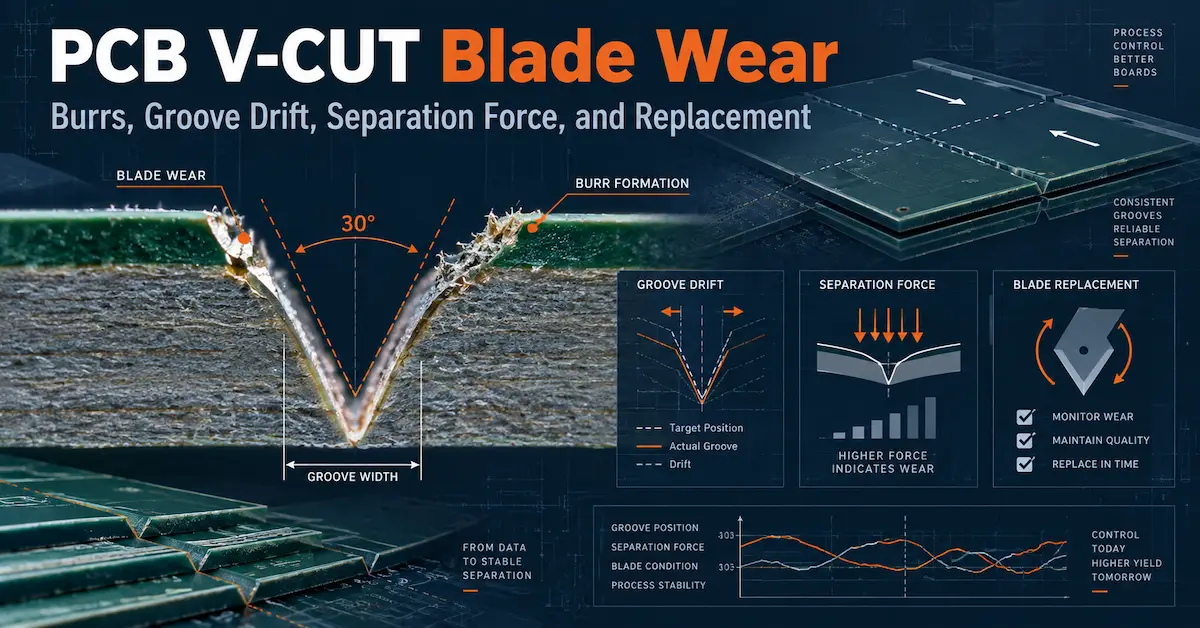
Why PCB V-CUT Blade Wear Changes the Cutting Process
A V-CUT blade creates two angled grooves that weaken the PCB panel along a controlled separation line. The blade edge determines how efficiently material is removed and how cleanly the groove root is formed.
During production, the blade experiences:
- Mechanical contact with PCB laminate and copper areas
- Abrasion from glass fiber materials
- Heat generated during continuous cutting
- Accumulated resin and debris on the cutting surface
- Changes in edge sharpness and groove geometry
As the cutting edge deteriorates, the blade may no longer remove material in the same way as a new blade. Instead of producing a clean V-shaped groove, it may create more friction, push material sideways, or leave uneven groove depths.
This is why pcb v cut blade wear should be evaluated as a process condition rather than only as a consumable cost.
A blade that is inexpensive but requires frequent adjustment, produces more burrs, or increases inspection time may have a higher total cost than a more durable blade that maintains stable quality.
Common PCB V-CUT Blade Wear Signs
The first step in blade management is recognizing when the cutting condition has changed.
Typical pcb v cut burrs and wear-related symptoms include:
| Symptom | Possible blade-related cause | Other factors to check |
|---|---|---|
| Increased burrs along groove edges | Cutting edge becoming less sharp | Blade alignment, board support, material |
| Rough groove surface | Blade wear or resin buildup | Cutting speed, debris removal |
| Higher separation force | Groove depth reduction or dull blade | Residual thickness, board design |
| Uneven separation between panels | Blade parallelism or uneven wear | Fixture condition, panel flatness |
| Copper tearing near groove | Damaged edge or incorrect groove position | Copper distribution, score depth |
| More operator force required | Reduced cutting efficiency | Separation method and support |
| Groove position deviation | Blade movement or mounting issue | Machine calibration |
These symptoms do not automatically confirm blade failure. For example, a dirty fixture can create uneven groove depth, while excessive residual thickness can increase separation force even with a new blade.
A controlled diagnosis should compare:
- New blade versus current blade
- Same PCB material
- Same machine setting
- Same panel position
- Same measurement method
Only then can the factory determine whether the blade is the main contributor.
How V Cutter Blade Life Should Be Measured
Many factories define blade replacement using panel count, but panel count alone may not represent actual cutting load.
A more useful measurement is based on:
- Total cutting length
- Number of panels processed
- PCB thickness
- Material type
- Copper density
- Groove depth
- Blade condition
- Separation results
For example, a blade cutting thin FR-4 panels with short groove lengths experiences a different workload from a blade processing thick multilayer panels with long score lines.
Therefore, v cutter blade life should be recorded together with process conditions.
A practical blade tracking record can include:
| Data Item | Purpose |
|---|---|
| Blade model and specification | Ensures traceability |
| Installation date | Tracks service duration |
| PCB material | Links wear to application |
| Panel quantity | Provides production reference |
| Cutting length | Measures actual workload |
| Groove inspection result | Evaluates quality |
| Replacement reason | Improves future planning |
A blade removed because of burr increase provides different information from a blade removed because it reached a planned maintenance interval.
Blade Wear and PCB V-CUT Burr Formation
One of the most visible consequences of blade wear is increased burr formation.
A sharp blade separates material with a cleaner cutting action. A worn blade may generate more pushing and friction, increasing the possibility of:
- Raised laminate edges
- Loose fiberglass
- Copper deformation
- Uneven groove walls
- Additional cleaning requirements
However, burrs are not caused by blade wear alone.
Other possible contributors include:
Blade Alignment
If the upper and lower blades are not correctly aligned, the groove may become wider or uneven. This can increase stress during separation.
Residual Thickness
A thicker remaining web may require more force, which can increase edge damage when operators manually separate panels.
Panel Support
Insufficient support allows the PCB to move during cutting, creating inconsistent groove geometry.
Material Construction
Different laminate structures respond differently to mechanical cutting. High copper areas, thicker multilayer boards, and special materials may require separate validation.
The correct response to burrs is therefore investigation, not immediate blade replacement.
Understanding Groove Drift During Blade Wear
Groove drift occurs when the actual V-cut position or geometry differs from the intended location.
This can happen when:
- The blade wears unevenly
- The blade mounting changes
- The machine guide system has play
- The panel shifts during processing
- The fixture surface accumulates debris
For high-density PCB panels, even small groove movement can affect separation quality or create stress near components.
During troubleshooting, inspect:
- Blade mounting condition
- Blade parallelism
- Machine alignment
- Panel positioning
- Fixture cleanliness
- Actual groove location
A worn blade should create a repeatable change. If the defect appears randomly across panels, the problem may involve support, alignment, or handling.
When Should V Groove Blade Sharpening Be Considered?
Some factories consider v groove blade sharpening as a way to reduce tooling cost. Whether sharpening is appropriate depends on blade design, material, manufacturer recommendation, and required cutting accuracy.
Sharpening may change:
- Blade diameter
- Cutting angle
- Edge geometry
- Groove depth relationship
- Separation behavior
A sharpened blade should not automatically be treated as identical to a new blade.
Before reuse, verify:
- Original blade specification
- Sharpening method
- Remaining diameter
- Cutting-angle accuracy
- Groove inspection results
For precision PCB applications, the question is not only “Can the blade cut?” but “Can the blade reproduce the approved groove process?”
A blade that cuts but changes residual thickness or separation force may create downstream problems.
How V-CUT Blade Replacement Affects Production Cost
A common mistake is evaluating v cut blade replacement only by purchase price.
The actual cost includes:
- Blade purchase cost
- Replacement labor
- Machine downtime
- Setup adjustment time
- First-piece inspection
- Scrap caused by incorrect settings
- Increased separation defects
A cheaper blade with unstable performance may increase total manufacturing cost.
A better calculation is:
Blade cost per accepted panel = Total blade-related cost ÷ Accepted panels produced
This measurement connects tooling expense with production results.
For example:
- Blade A costs less but requires frequent replacement
- Blade B costs more but maintains stable groove quality longer
The better choice depends on accepted production output, not the initial blade price.
Selecting the Right V-CUT Machine and Blade System
Blade performance is closely connected with the machine platform.
A stable V-CUT system should provide:
- Accurate blade positioning
- Reliable depth adjustment
- Consistent panel support
- Easy blade replacement
- Repeatable setup after maintenance
CHIKIN provides different V-CUT equipment configurations, including:
- Single Cutter PCB V-CUT Machine
- 4 Cutter Automatic PCB V-CUT Machine
- 6 Cutter Automatic PCB V-CUT Machine
Different configurations suit different production requirements.
A lower-volume factory with frequent product changes may prioritize flexibility and setup control. A high-volume PCB manufacturer may prioritize automated positioning, repeatability, and reduced operator adjustment.
The machine selection should match:
- Panel size
- Production quantity
- Groove directions
- Blade replacement frequency
- Required separation quality
Blade Inspection Checklist Before Replacement
Before replacing a V-CUT blade, check:
1. Visual Condition
Inspect:
- Cutting edge damage
- Chipping
- Resin buildup
- Uneven wear
2. Groove Quality
Check:
- Groove depth
- Groove width
- Edge appearance
- Burr condition
3. Separation Performance
Measure:
- Required separation force
- Crack direction
- Edge damage
4. Machine Condition
Verify:
- Blade mounting
- Alignment
- Fixture condition
- Panel positioning
A blade should be replaced because evidence shows the process is no longer stable, not only because it has reached a fixed number of panels.
Creating a Reliable V-CUT Blade Maintenance Plan
A good maintenance plan combines preventive checks and production feedback.
Recommended records:
| Check Item | Frequency |
|---|---|
| Blade appearance | Regular production checks |
| Groove inspection | First piece and scheduled sampling |
| Separation quality | During quality inspection |
| Blade replacement history | Every replacement |
| Machine alignment | After maintenance or adjustment |
| Fixture condition | Regular cleaning |
The replacement threshold should be based on actual process requirements.
A factory producing simple boards may accept a different blade life compared with a manufacturer producing high-density assemblies with sensitive components.
FAQs About PCB V-CUT Blade Wear
What causes PCB V-CUT burrs?
PCB V-CUT burrs can result from blade wear, incorrect blade alignment, unsuitable groove depth, poor panel support, or material-related cutting behavior. A blade replacement should be confirmed through comparison testing.
How long does a V-CUT blade last?
There is no universal blade life. It depends on PCB material, thickness, groove length, cutting depth, blade quality, and production conditions.
Can a V-CUT blade be sharpened?
Yes, some blades may be suitable for sharpening, but the result depends on maintaining original geometry and required groove accuracy. Always verify the sharpened blade through testing.
When should I replace a V-CUT blade?
Replace the blade when groove quality, separation force, burr level, or dimensional stability moves outside the approved process range.
**Does a new blade always solve separation problems?
No. Separation issues can also come from residual thickness, board design, fixture problems, or incorrect machine settings.
How can I extend V-CUT blade life?
Maintain correct machine settings, clean the cutting area, avoid excessive cutting load, monitor groove quality, and replace blades before severe wear affects production.
Why does groove depth change during production?
Possible causes include blade wear, mounting changes, machine adjustment drift, fixture contamination, or panel thickness variation.
What information should be provided when buying replacement blades?
Provide machine model, blade specification, PCB thickness, groove requirements, material type, and previous blade performance data.
Conclusion
PCB V-CUT blade wear directly influences burr formation, groove consistency, separation force, and production stability. A reliable blade-management process requires more than counting processed panels. Manufacturers should monitor groove quality, residual thickness, separation behavior, and blade condition together.
Understanding v cutter blade life, identifying pcb v cut burrs, evaluating v groove blade sharpening, and planning v cut blade replacement based on production evidence can reduce unexpected downtime and improve PCB panel separation consistency.
For V-CUT machine selection, blade compatibility evaluation, or process improvement discussions, provide your PCB thickness, panel design, groove requirements, production volume, and current cutting issues to CHIKIN through the contact page. A sample-based evaluation is the best way to establish a stable V-CUT process window.